
Data import
Drag and drop files from more than 10 supported formats. Nucfile parses the data instantly and prepares it for analysis.
Nucfile brings nuclear simulation data into one workspace for import, visualization, comparison, and structured export. It supports demanding engineering workflows and uses local artificial intelligence to help users work with complex results.
Nucfile brings nuclear simulation data into one workspace for import,
visualization, comparison, and structured export. It supports
demanding engineering workflows and uses local artificial
intelligence to help users work with complex results.
Supported file formats
What Nucfile can do
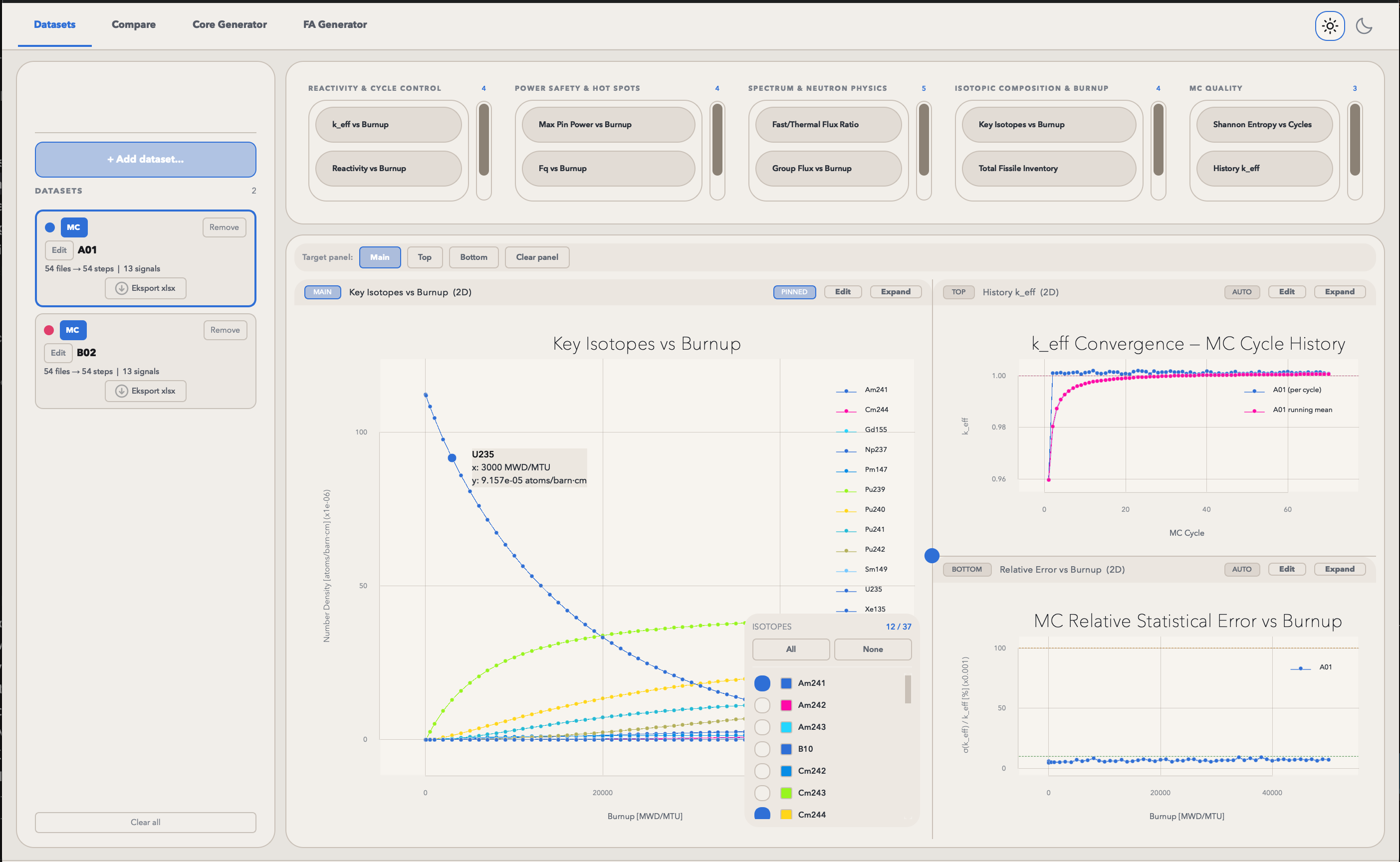
Nucfile combines import, visualization, and comparison in one simple tool.
Drag and drop files from more than 10 supported formats. Nucfile parses the data instantly and prepares it for analysis.
Based on the imported data, Nucfile generates charts and graphs itself or you can plot what you need.
Compare datasets from different format files and sources side by side. Nucfile is built for benchmarks and comparative analysis.
Save finished analyses and visualizations so you can share them easily or add them to a report.
Download
Nucfile is currently under active development. Windows and macOS versions will be available soon.
About Nucfile
Until now, there has been no single tool in the nuclear design industry focused on extracting multiple types of data from multiple file formats within one software platform.
Nucfile brings data from multiple file formats into one workflow, reducing the need for manual conversion and separate processing steps.
Access every data point in your report within five minutes, from import to clear and usable visualizations.
Nucfile was created to address the practical challenges of working with nuclear design data. These workflows are often demanding, repetitive, and time consuming. Nucfile simplifies the process and helps users work more clearly and efficiently.
FAQ
Answers to common questions about Nucfile, its workflow, and availability.
Nucfile is an all in one tool for data analysis. It lets you import files from many formats, generate visualizations automatically (or manually, depending on your needs), and compare data from multiple sources in one place in just a few seconds.
Built for nuclear design professionals and enthusiasts working with various file types. If you compare datasets, build benchmarks, or need fast visualizations from raw data, Nucfile is for you.
Nucfile is currently under active development. Windows and macOS versions will be released soon. Email us at contact@nucfile.com if you want to be notified when it launches.
During the development phase, access is offered to selected beta users under early access terms while we collect product feedback. Commercial plans will be announced closer to general release.
We are putting our greatest effort into providing an environment that makes our users feel comfortable and confident while using Nucfile. That is why Nucfile is designed to work offline during normal use, so an active internet connection is not required for everyday data processing and visualization. Internet access may only be needed for downloading or updating the software, and updates are installed manually by the user. In a time of rapid industrial change, we believe there are still some things that should remain offline.